Partner POV | Microsoft Agent 365, now generally available, expands capabilities and integrations
In this article
This article was written by Nirav Shah | Corporate VP, Agent 365; Rob Lefferts | Corporate VP, Microsoft Threat Protection and Jason Roszak VP of Product Management, Enterprise Management and Security at Microsoft
The problem isn't that agents exist. It's that they proliferate fast, span apps, endpoints and cloud, and often operate outside the visibility and control of the teams accountable for risk. When an agent can invoke tools, access data, and interact with other agents, any "helpful" workflow can turn into data oversharing, tool misuse, or over-privileged actions in seconds. And as agents become even easier to create and deploy, your attack surface grows with them.
That's why end-to-end observability matters: you can't govern what you can't see, and you can't secure what you don't understand—especially when the number of agents is a moving target.
Microsoft Agent 365 helps you take control of agent sprawl as your control plane to observe, govern, and secure agents and their interactions—including agents built with Microsoft AI and agents from our ecosystem partners—using the admin and security workflows your teams already run.
General availability starts today for Agent 365.
Additionally, we're announcing the previews of new Agent 365 capabilities and integrations to help you scale agent adoption with the right controls in place.
- Observability, governance, and security for agents operating independently—Agent 365 is expanding to cover agents that operate with their own credentials and permissions.
- Discovery of agents and shadow AI, using capabilities of Microsoft Defender and Microsoft Intune for both local and cloud agents.
- A secured, managed environment for agents to work in Windows 365 for Agents.
- Coverage for a wide ecosystem of SaaS agents, including agents innovated by software development companies (SDCs).
- Support for evaluation, adoption, and usage from Microsoft and ecosystem partners worldwide.
Manage agents with a single control plane, regardless of how or where they work
As organizations move from pilot to adoption, AI agents are being deployed across increasingly diverse use cases. Some act with delegated access, working on behalf of users; others operate with their own credentials and permissions, participating in team workflows or operating behind the scenes.
With Agent 365, you can observe, govern, and secure AI agents whether they act on behalf of users with delegated access—for example, an agent that helps employees organize their inbox—or agents that operate with their own access and scope of work—such as an agent autonomously triaging support tickets.
Discover and manage local and cloud-hosted agents
Users are installing agents like OpenClaw and Claude Code on their devices and adopting SaaS agents built by developers on new and emerging platforms. Many of these local and cloud-hosted agents run unmanaged and outside of traditional governance, as they autonomously execute tasks, modify code, or access confidential information, creating a new wave of shadow AI.
To help organizations address accelerating agent sprawl and the rise of unmanaged agents, we're introducing new capabilities as part of Agent 365, Microsoft Defender, and Intune so you can discover shadow agents, and apply appropriate controls, such as blocking unmanaged agents.
Discover and manage local agents
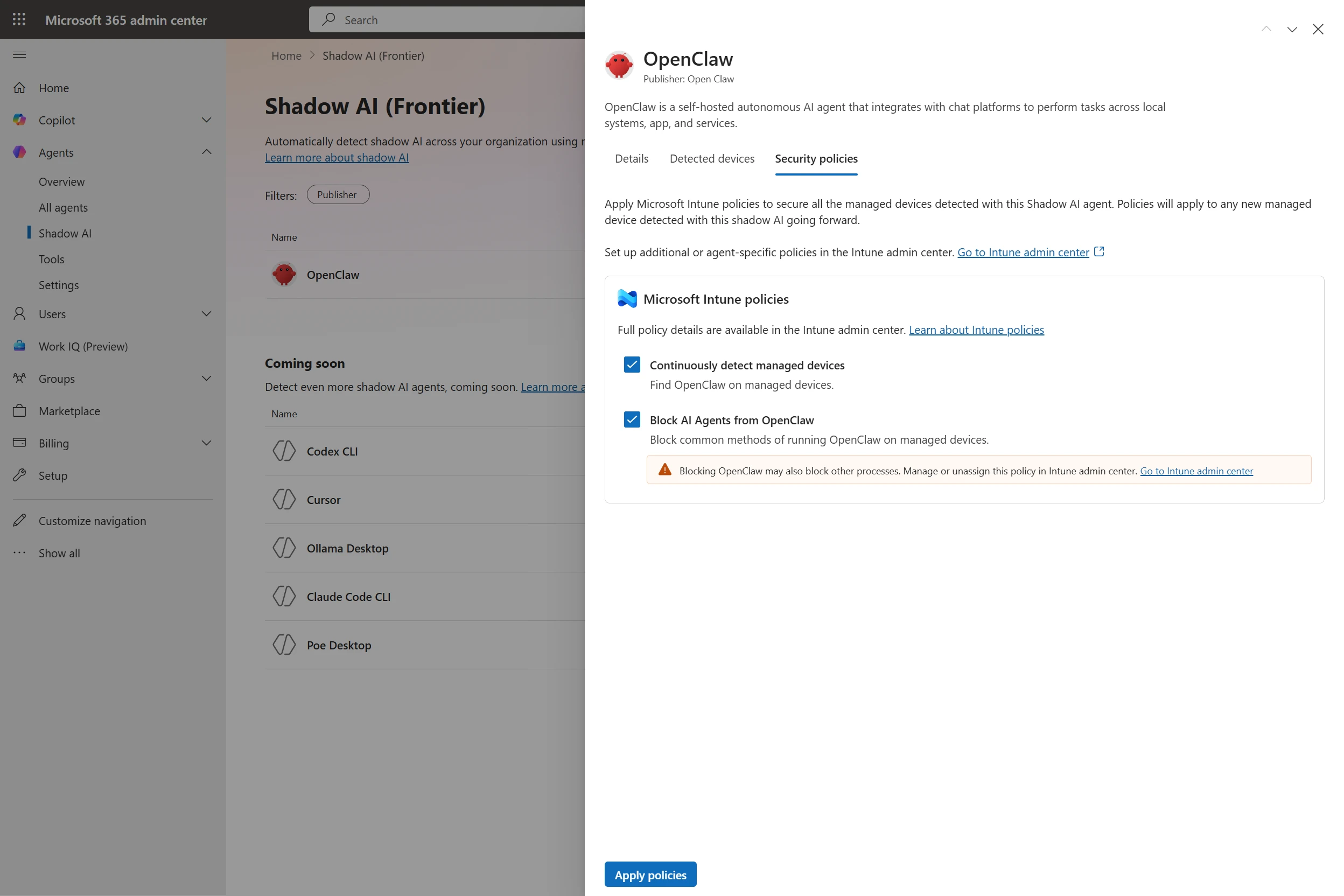
With Microsoft Defender and Intune, organizations will be able to discover and manage local AI agents running on Windows devices, starting with OpenClaw agents and expanding soon to other widely used agents like GitHub Copilot CLI and Claude Code. Customers enrolled in the Frontier program can see if OpenClaw agents are being used in the organization, which devices they are running on, and use Intune policies to block common ways that OpenClaw runs on the new Shadow AI page in Agent 365 in the Microsoft 365 admin center and in the Intune admin center. Through Agent 365 registry, the inventory of local agents will be available in Defender and Intune so IT, endpoint management, and security teams can get a consistent view of discovered local agents in their environment and take appropriate action.
Starting in June 2026, Microsoft Defender will also provide asset context mapping for each agent including the devices they run on, MCP servers configured for those agents, the identities associated with them, and the cloud resources those identities can reach. This will give security teams the context needed to assess exposure and potential blast radius. They can then investigate agent activity, such as file access and network behavior, using familiar endpoint data, and use those insights to identify misconfigurations and even define custom detections.
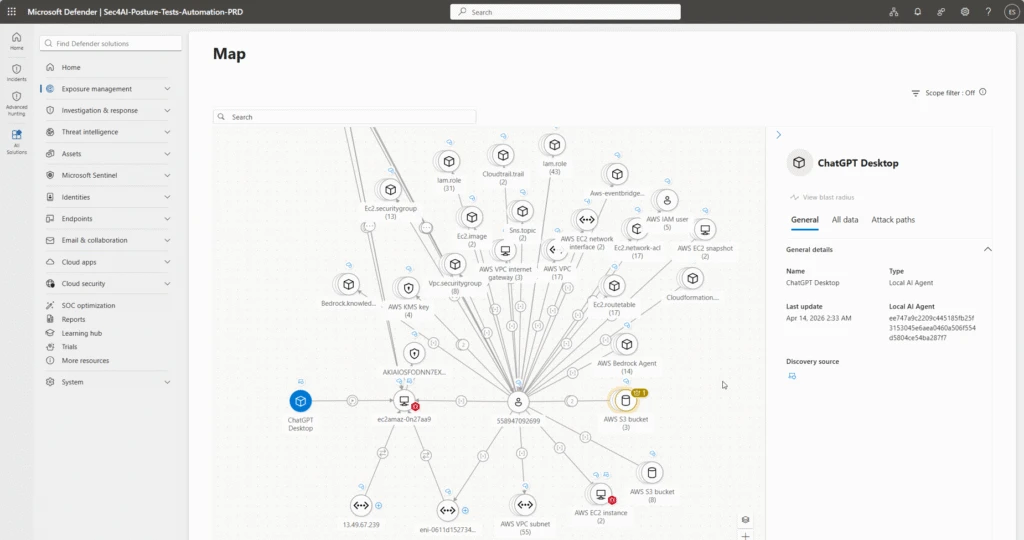
Beyond monitoring, organizations will be able to apply policy-based controls to set guardrails for what agents are allowed to do—helping protect both agents and organizations from compromise and misuse—with initial support delivered for OpenClaw through Intune. If a managed agent exhibits malicious behavior patterns, such as attempting to access or exfiltrate sensitive data, Defender will be able to block coding agents in runtime and generate alerts with rich incident context to support investigation and response.
Context mapping capabilities, policy-based controls, plus runtime blocking and alerts will be available in Agent 365 through Intune and Defender public preview in June 2026.
Visibility across clouds and AI-builder platforms
As developers are rapidly building agents with Microsoft Foundry, AWS Bedrock, and Google Gemini Enterprise Agent Platform (formerly Google Vertex AI) and deploying cloud agents across multicloud and multi-platform environments, the agent sprawl challenge intensifies. To manage potential security risks or vulnerabilities before they become breaches, security and IT teams need visibility to which cloud agents are running, what models these agents are built on, and what resources they're accessing.
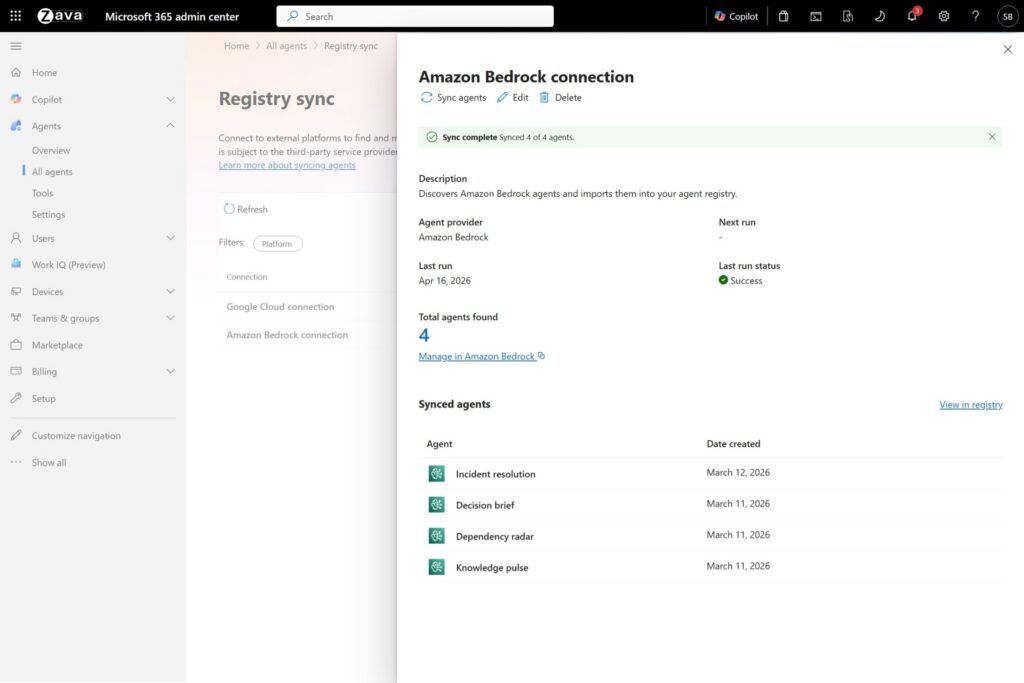
Today, we are excited to announce the public preview of Agent 365 registry sync with AWS Bedrock and Google Cloud connections, enabling IT teams to automatically discover, inventory, and, soon, perform basic lifecycle governance—for example, start, stop, delete agents—across these platforms.
Secure agents as they work in Windows 365
While Agent 365 provides the control plane to observe, govern, and secure agent activity across the enterprise, Windows 365 for Agents—now available in public preview (in the United States only)—provides a secured, managed environment where agents can carry out that work. It introduces a new class of Cloud PCs purpose-built for agentic workloads and managed in Intune, allowing agents to run in policy-controlled environments, interact with applications, and operate with the same identity, security, and management controls already used for employees.
Now, with Agent 365, you can also observe and secure agents running on Windows 365 for Agents in Microsoft 365 admin center, understanding which agents are connected to the cloud-powered compute. Together, they enable organizations to move from visibility and governance of agents to confidently running them in production environments.
Secure agents against internet threats with network controls
AI agents can operate much faster than human users. Without proper guardrails, they can connect to risky web destinations, interact with unsanctioned AI services, handle sensitive files unsafely, or be manipulated through malicious prompt-based attacks. These risks are harder to manage when security teams lack consistent visibility and controls for agent traffic to internet, SaaS, and AI services.
To give security teams a consistent way to inspect agent traffic at the network layer, in general availability today, Agent 365 extends Microsoft Entra network controls to Microsoft Copilot Studio agents and agents running on user endpoint devices, including local agents such as OpenClaw. These controls can help identify unsanctioned AI usage, restrict connections to only approved web destinations, filter risky file movement, and help block malicious prompt-based attacks before they lead to harmful actions.
How to get started with Agent 365
Agent 365 is now available in Microsoft 365 E7 or standalone at USD15 per user per month. Each Agent 365 license covers an individual who manages or sponsors agents, or uses agents to do work on their behalf, ensuring all agent activity is consistently governed across the organization in a way that's predictable for scaled growth.
In addition to the expertise of your Microsoft 365 team and partners, Agent 365 resources to support your experience include:
- The Agent 365 blog.
- The adoption hub and getting started guide.
- AI Skills Navigator for Agent 365.
- Technical documentation on Microsoft Learn.
Plus, on Tuesday, May 12, 2026, a team of Agent 365 experts are hosting a live "Ask Microsoft Anything" to answer your questions about Agent 365—we hope you'll join for the discussion.