Partner POV | Building your GenAI Agents on VCF with Private AI Services
In this article
Article written by Tasha Drew, Director of Product Engineering, AI, Broadcom
At VMware Explore's general session you saw Chris Wolf demonstrate Intelligent Assist for VMware Cloud Foundation, providing AI-powered assistance for our users. In this blog, we'll take a step behind the curtain to see how these capabilities are running in VCF, using AI features that our customers can also use to build their own AI experiences with their own private data.
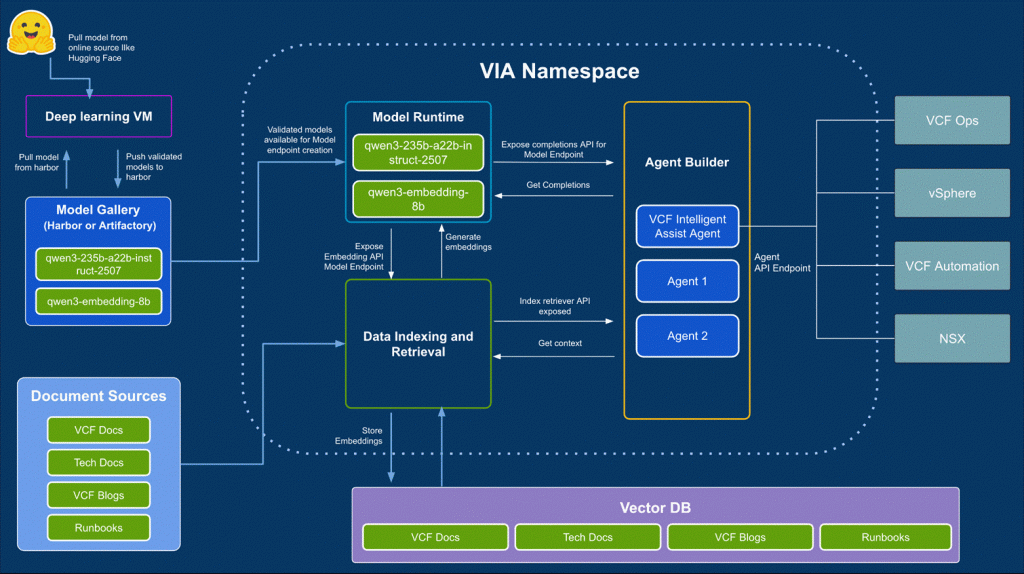
VMware Private AI services enable administrators to safely and securely import and share approved AI models (Model Gallery and Model Governance); scale and run Models as a Service for their organization (Model Runtime and ML API gateway); create Knowledge bases and regularly refresh data in a fully supported vector database for creating RAG applications (Data Indexing and Retrieval Service in partnership with Data Services Manager); and provide developers a UI where they can compose models, knowledge bases, and tools together to create Agents (Agent Builder).
The Intelligent Assist service is using these capabilities to run the Intelligent Assist agent, and VCF engineering teams are using these services as a common AI platform to deliver joint services and AI workflows.
Customers can also use these same capabilities for their own teams.
Model Gallery and Model Governance
These features give private cloud administrators what they need to safely download, validate, and share models with teams across their cloud. Learn about how to safely onboard popular models from upstream and ensure the model's behavior meets your enterprises' expectations and requirements – and behavior doesn't drift over time.
Model Runtime and ML API Gateway
Now that you have models securely imported and shared with the right folks in your organization, you will want to run them in an efficient and scalable way. Gone are the days of every division running their own separate copies of the same popular models – instead your team can provide Models as a Service using the Model Runtime. Deploy models on a fully maintained runtime stack from directly within VCF, and then horizontally scale them as they come under load with no end user impact, as users broker their requests via the ML API gateway. This also gives you flexibility to do rolling upgrades of models with zero end user impact. This method of deploying models allows separate lines of business or tenants within a Cloud Service Provider to keep their data separate from each other while ensuring high GPU utilization.
Data Indexing and Retrieval
With your development teams able to access Models as a Service to power their various workloads, the most popular GenAI application pattern in the enterprise today goes a step further: Retrieval Augmented Generation (RAG) applications. In this deployment pattern, you instruct your model to answer questions by searching your enterprise's documentation, which you provide to the model by loading it in a vector database (and running an embedding model – which is fully supported by our model runtime).
However, in talking to customers we found that connecting to Data Sources (e.g., Confluence, Google Drive, SharePoint, S3), generating your document chunks and vector embeddings, storing that in a vector database, and then regularly refreshing your data to ensure the documents in your vector database are current was a big challenge. So we've created the Data Indexing and Retrieval Service, which provides data connectors for popular document repositories and enables you to set a document refresh policy according to how frequently that data changes.
Once Data Sources are configured, they can be combined into Knowledge Bases, which are consumable envelopes of documents within a vector database.
Additionally, Private AI Services includes entitlements to VCF's Data Services Manager (DSM) to offer Database-as-a-service for postgres with pgvector. This gives you a built-in vector database ready to feed your RAG workloads.
Agent Builder
At this point, you've got Models as a Service and Knowledge Bases indexed and are ready to make ChatBots. The next step is enabling your users to build their AI experiences. Agent Builder is a one stop shop where those users can log in, see what models are available to them to use, and what Knowledge Bases are created for them. From there, they can compose AI Agents using Models, Knowledge Bases, and providing specific prompt instructions. A playground in the UI enables a quick development loop to try out different configurations, tools, models, and prompts. Once a user is happy with the result, they can save it and use the Agent they've created as a backend for their AI application.